Cursor AI Coding Assistant
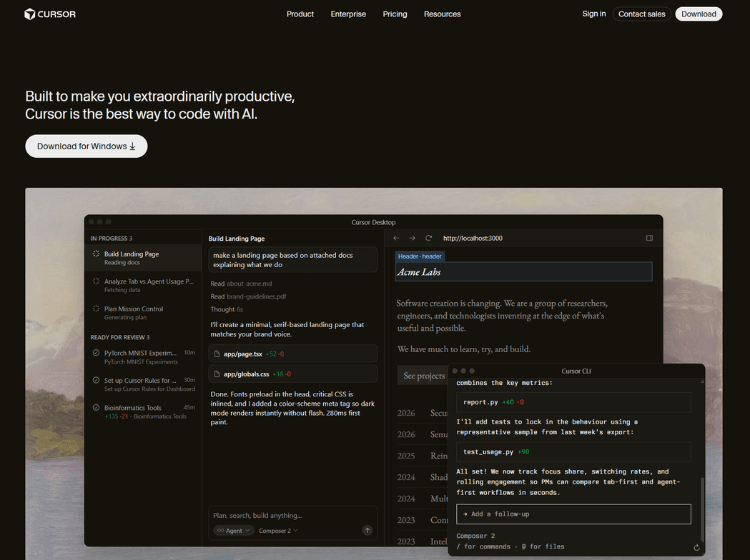
What is Cursor AI: Overview
Cursor AI is an AI-first integrated development environment designed to enhance software development through deep AI integration. Built as a fork of Visual Studio Code, it combines traditional coding features with advanced capabilities like natural language code editing, intelligent autocomplete, and full codebase understanding.
Unlike typical coding assistants, Cursor can analyze entire repositories, allowing developers to ask questions about their code, refactor multiple files simultaneously, and implement changes using plain English instructions. It supports multiple AI models and integrates with existing developer tools, making it adaptable to different workflows.
Cursor AI also assists with debugging, generating test cases, and optimizing code performance. By embedding AI directly into the coding environment, it reduces the need to switch between tools, helping developers stay focused and productive. It is particularly useful for working on large, complex projects where understanding context across files is essential.
Key Features of Cursor AI
- AI-powered code editor with natural language instructions
- Codebase-aware chat for understanding entire projects
- Multi-file refactoring and smart code rewriting
- Intelligent autocomplete with multi-line suggestions
- Built-in debugging, error detection, and test generation
How to Use Cursor AI (Step-by-Step)
Here are the simple steps to start using the Cursor.com platform.
Step 1. Download and install Cursor AI from the official website
Step 2. Open an existing project or create a new one
Step 3. Start coding and use AI autocomplete suggestions
Step 4. Highlight code and give instructions in plain English
Step 5. Use chat to ask questions about your codebase
Step 6. Apply suggested fixes, refactors, or optimizations
Step 7. Run and test your code within the editor
Use Cases of Cursor AI
- Building applications faster with AI-assisted coding
- Refactoring and maintaining large codebases
- Debugging errors with AI-generated fixes
- Learning unfamiliar codebases through contextual queries
- Generating test cases and improving code quality
Target Audience of Cursor AI
- Software developers (frontend, backend, full-stack)
- Startup teams and indie developers
- DevOps and data engineers
- Engineering teams working on large repositories
- Developers transitioning to AI-assisted workflows
Cursor AI Pricing
1. Hobby – Free
- No credit card required
- Limited Agent requests
- Limited Tab completions
2. Pro – $20 / mo
- Everything in Hobby, plus:
- Extended limits on Agent
- Access to frontier models
- MCPs, skills, and hooks
- Cloud agents
3. Pro+ – $60 / mo
- Everything in Pro, plus:
- 3x usage on all OpenAI, Claude, Gemini model
4. Ultra – $200 / mo
- Everything in Pro, plus:
- 20x usage on all OpenAI, Claude, Gemini models
- Priority access to new features