Heygen AI Video Generator
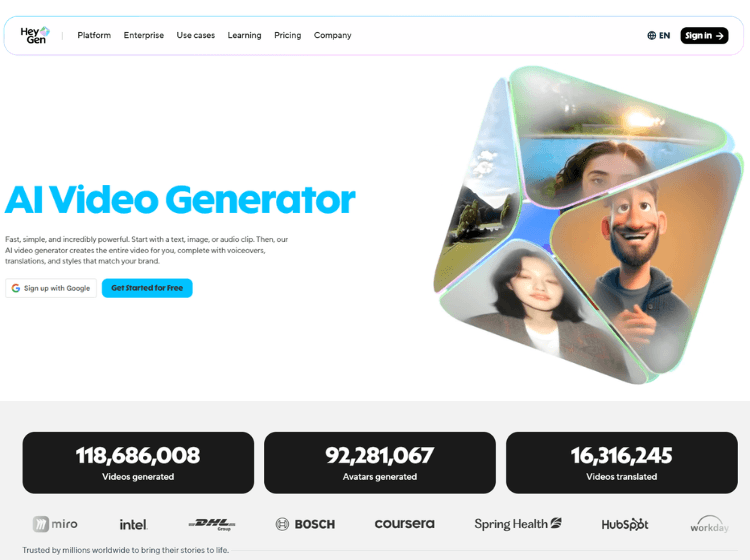
What is Heygen: Overview
HeyGen AI is an all-in-one AI video creation platform designed to simplify video production without requiring technical expertise or traditional filming equipment. It enables users to generate high-quality videos using text prompts, scripts, images, or audio inputs. The platform offers a library of realistic AI avatars and voices, allowing users to create engaging content for marketing, training, sales, and social media.
With features like text-to-video generation, multilingual voiceovers, and customizable templates, HeyGen helps businesses scale video production efficiently. It also supports video translation and personalization, making it suitable for global audiences. The platform integrates scripting, editing, and rendering into a single workflow, reducing production time significantly.
HeyGen is widely used by marketers, educators, and content creators who want to produce professional videos quickly while maintaining consistency and brand identity across content.
Key Features of Heygen
1. Video Avatar – Record yourself once and reuse it as your digital twin
2. Photo Avatar – Bring any picture to life with voice and motion
3. Avatar IV – Create lifelike avatars from a single photo
4. Video Translator – AI video translation with perfectly synced voice
5. Video Agent – Generate professional videos from simple prompts with script, visuals, and voice.
6. AI Studio – Edit and customize videos with avatars, voices, and simple tools.
7. Live Avatar – Add avatars that can respond in real time
8. AI Avatar Generator – Build a custom avatar that looks and sounds like you
9. AI Dubbing – Replace voices and languages with natural lip sync
10. Text to Video – Turn scripts into ready-to-share videos
11. Image to Video – Drop in a photo, watch it turn into a video
12. AI Video Generator – AI tool that transforms text or images into realistic, high-quality videos in seconds
How to Use the Heygen AI Tool?
To use Heygen AI to create avatar videos, follow these general steps:
1. Create an Account and Log In
- Sign up for a Heygen account on their website.
- Log in to access the Heygen dashboard.
2. Create or Choose Your AI Avatar
- You can make a digital clone of yourself by adding images and videos.
- Alternatively, choose from a large selection of customized avatars of various ethnicities, ages, and styles.
- If desired, you can customize the avatar’s appearance.
3. Start a New Video Project
- Click on “Create Video” and choose “Avatar Video.”
- You may start from scratch or select a template.
4. Edit Your Script and Add Voice
- Enter or edit your video script.
- Select a voice for your avatar: utilize text-to-speech voices, your recorded voice, or clone your voice.
- You can also include background music and voiceovers if necessary.
5. Animate Your Avatar
- Let Heygen animate the avatar’s lip sync and facial expressions based on your script.
- If needed, you can add other items like as stickers, icons, or backdrops.
6. Preview and Finalize
- Check the created video to ensure everything seems correct.
- Click “Submit” to finish the video.
- Once processed, download or share it via link.
7. Additional Features
- Translate videos into 170+ languages with realistic lip sync.
- Use Heygen’s AI Script Generator to help write scripts.
- Create how-to videos by recording the screen.
This step-by-step approach allows both beginners and professionals to easily generate high-quality AI avatar videos that do not require filming or editing expertise.
Heygen’s Use Cases
1. Marketing: Creating high-performing AI video ads quickly, personalized promotional videos, product demos, customer success stories, and social media clips.
2. Training and E-Learning: Developing engaging training modules, onboarding videos, and interactive learning courses.
3. Healthcare Education: Simplifying medical topics for better understanding and education.
4. Internal Communications: Streamlining company announcements, employee performance reviews, and training materials with personalized videos.
5. Customer Service: Building interactive help guides, FAQs, and instructional videos with or without avatars.
6. Content Creation: Generating scalable video content in multiple languages, including video translation with lip-sync to reach a global audience.
7. Personalization and Localization: Creating digital avatars, voice cloning, and generating localized videos for different markets with consistent messaging and branding.
8. Media and News Broadcasting: Enhancing newsroom video production with AI avatars for faster turnaround and cost savings.
Who is Heygen AI Video Generator for?
- Digital Marketers
- Educators and Corporate Trainers
- Sales Teams
- Content Creators and Small to Medium-Sized Businesses (SMBs)
- Corporate Sector
Flexible Pricing Plans of Heygen
HeyGen offers multiple pricing tiers designed for individuals, creators, teams, and enterprises. The plans are mainly structured around video generation limits, features, and collaboration capabilities.
1. HeyGen Pricing For Individuals:
- Free $0/mo – Ideal starting point for creators and marketers who want to try out AI tools, such as HeyGen’s AI video maker.
- Creator $29/mo – Unlimited avatar videos designed for solo creators. Includes access to advanced features like the AI video generator and AI voice-over.
- Pro $99/mo – Designed for advanced users creating premium content at scale. Unlock 10× more access to premium features and export in stunning 4K video quality.
2. HeyGen Pricing For Businesses:
-
Business $149/month – Additional seats are ₹20 per seat. Secure, scalable video creation for teams and businesses.
-
Enterprise (Contact Sales) – Studio-quality video creation tailored to your business needs.