Orchids AI App Builder
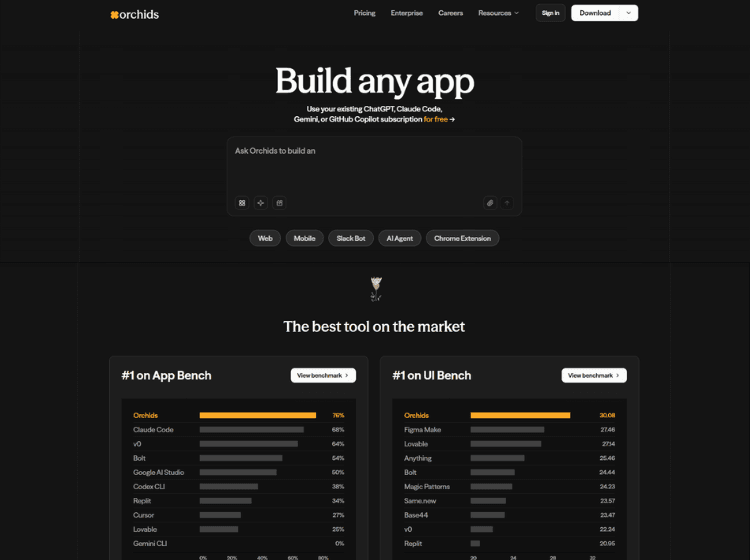
What is Orchids: Overview
Orchids is an AI application development platform designed to help users build software projects through conversational prompts and AI-assisted workflows. The platform supports building web applications, mobile apps, AI agents, browser extensions, Slack bots, and other digital products across different technology stacks.
Orchids includes tools for visual editing, code editing, project collaboration, analytics, publishing, and custom domain deployment. Users can manually edit generated code, restore previous project versions, remix projects, and collaborate with team members through shared project access.
The platform also supports multiple frameworks and languages, including React, Next.js, Python, Flutter, and Swift. According to the official documentation, users can connect existing AI subscriptions such as ChatGPT, Claude Code, Gemini, and GitHub Copilot, or use their own API keys for model access.
Orchids is positioned for developers, designers, startups, marketers, and teams looking to prototype, design, and launch applications with reduced manual coding effort.
Key Features of Orchids
- AI-powered app generation using natural language prompts
- Supports web apps, mobile apps, AI agents, Slack bots, and browser extensions
- Built-in code editor with manual editing support
- Collaboration tools with project sharing and remix functionality
- Publishing, analytics, and custom domain support for deployed projects
How to Use Orchids: Step-by-Step
Here are the simple steps to start using the Orchids app.
Step 1. Visit the official Orchids website
Step 2. Sign up using email, Google, or GitHub
Step 3. Create a new project from the dashboard
Step 4. Describe the app or website you want to build using prompts
Step 5. Let the AI generate the project structure and interface
Step 6. Edit the design visually or modify the generated code manually
Step 7. Preview, test, and collaborate with team members if needed
Step 8. Publish the project and connect a custom domain if required
Use Cases of Orchids
- Building MVPs and startup prototypes
- Creating landing pages and marketing websites
- Developing AI agents and automation tools
- Designing internal business dashboards and utilities
- Rapid prototyping for product and UI testing
Target Audience of Orchids
- Developers
- Startup founders
- Product managers
- UI/UX designers
- Marketing teams
- No-code and low-code builders
- Agencies and freelancers
Orchids Pricing
- 100k credit limit / month
- 3 projects
- 2M credit limit / month
- 10 projects
- 4M credit limit / month
- Everything in Pro, plus
- Unlimited projects
- Pay as you go
- 12M credit limit / month
- Everything in Premium, plus
- Priority support
- 30M credit limit / month
- Everything in Ultra, plus
- Discounted credit rates?
- Priority access to new features