Piclumen AI Video and Image Tool
What is Piclumen AI: Overview
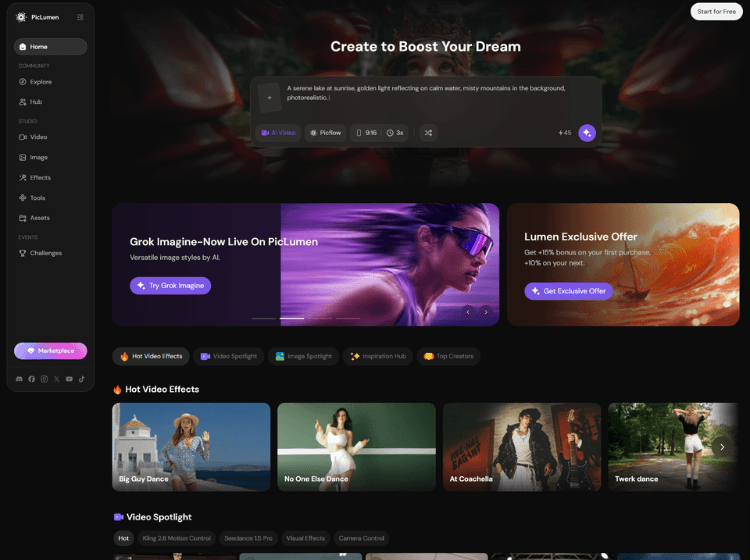
PicLumen AI is an all-in-one AI image and video generation platform designed to help users create visual content using text prompts and reference images. The platform includes text-to-image generation, image-to-image transformation, AI video creation, background editing, image upscaling, character generation, and creative style transfer tools. Users can generate visuals in multiple styles including realistic art, anime, digital illustration, cinematic visuals, and 3D-inspired artwork.
PicLumen also provides customization features such as content reference, character consistency, and style reference modes for maintaining visual continuity across projects. The platform supports use cases like social media graphics, storytelling, concept art, marketing materials, branding assets, gaming visuals, and educational content.
According to its website, PicLumen offers both free and paid access plans, with browser-based tools intended for beginners as well as professional creators. The platform also includes a creative community where users can explore and share AI-generated content.
Key Features of Piclumen
- AI text-to-image generation with multiple artistic styles
- Image-to-image transformation using reference images
- AI video generation tools including text-to-video and image-to-video
- AI editing tools such as background removal, upscaling, and colorization
- Character, content, and style reference modes for consistent visual outputs
How to Use Piclumen AI: Step-by-Step
To use PicLumen AI for generating images and videos, follow these steps:
Step 1: Visit the Platform
Go to PicLumen AI Official Website.
Step 2: Choose a Tool
Select the tool you want to use, such as:
- Text to Image
- Image to Image
- AI Video Generator
- AI Upscaler
- Background Remover
Step 3: Enter a Prompt or Upload an Image
- For text-based generation, type a detailed prompt describing the desired output.
- For image transformation, upload a reference image.
Step 4: Select a Style or Model
Choose from available visual styles or AI models depending on the content type you want to create.
Step 5: Customize Settings
Adjust options such as:
- Style references
- Character consistency
- Image quality
- Motion settings for video generation
Step 6: Generate Content
Click the generate button and wait for the AI to create the result.
Step 7: Edit and Export
Use built-in editing tools if needed, then download the final image or video for personal or commercial projects.
Use Cases of Piclumen AI
The use cases of PicLumen AI span a wide range of creative and professional fields:
- Creating social media graphics and promotional visuals
- Designing concept art, game assets, and illustrations
- Generating AI-based marketing materials and advertisements
- Producing storytelling visuals and comic-style artwork
- Creating branded content and product showcase images
Who is It for?
PicLumen AI is designed for a broad range of users across creative, professional, and business domains:
- Graphic designers
- Digital artists and illustrators
- Content creators and influencers
- Marketing and branding teams
- Game developers and storytellers
- Small businesses and eCommerce sellers
- Beginners exploring AI-generated art
Pricing and Plans
1. Mini – $2.40/mo
- 10 Lumens reset daily
- 600 Lumens per month
- Limited image generation in Relax Mode (PicLumen models)
- Queue up to 3 generations
- Generate up to 4 images per request (excluding third-party models)
2. Standard – $6.30/mo
- 10 Lumens reset daily
- 2,000 Lumens per month
- Unlimited image generation in Relax Mode (PicLumen models)
- Queue up to 5 generations
- Generate 2 tasks at once
- Generate up to 4 images per request (excluding third-party models)
3. Pro – $11.00/mo
- 10 Lumens reset daily
- 5,000 Lumens per month
- Unlimited image generation in Relax Mode (PicLumen models)
- Unlimited video generation in Relax Mode (PicLumen models)
- Queue up to 10 generations
- Generate 5 tasks at once
- Generate up to 4 images per request (excluding third-party models)