Kimi AI-Powered Assistant
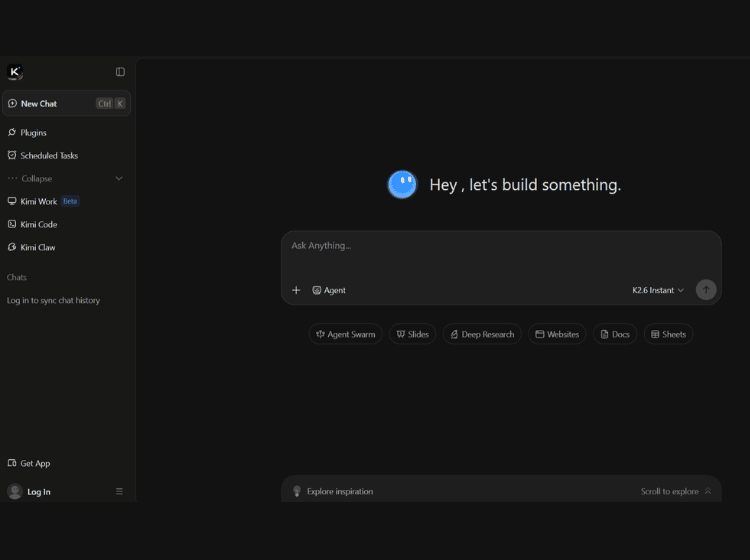
What is Kimi AI: Overview
Kimi is an AI-powered productivity platform developed to assist with a wide range of knowledge work. It supports document analysis, deep research, website creation, spreadsheet assistance, presentation generation, coding, and collaborative AI workflows. The platform also includes Agent Swarm, enabling multiple AI agents to work together on larger or more complex tasks.
Users can interact with Kimi through a conversational interface while leveraging specialized tools for handling documents, creating slides, generating websites, processing data, and automating repetitive workflows. The platform is designed to support both individual productivity and advanced development use cases, including coding assistance through Kimi Code.
Kimi is available through a web interface and offers both free and membership-based plans with additional usage limits and advanced capabilities. It also provides developer options through APIs and supports long-context tasks for handling extensive documents and complex reasoning workflows.
Key Features of Kimi
- AI chat assistant for research, reasoning, and general productivity
- Deep Research for analyzing information and complex topics
- AI-powered document, spreadsheet, presentation, and website creation
- Agent Swarm for coordinating multiple AI agents on larger tasks
- Kimi Code for coding assistance, development workflows, and API integration
How to Use Kimi: Step-by-Step
Here are the simple steps to start using the Kimi AI platform.
Step 1. Visit the official Kimi website.
Step 2. Create an account or sign in.
Step 3. Start a new conversation with the AI assistant.
Step 4. Enter your prompt, question, document, or task.
Step 5. Choose specialized tools when needed, such as:
- Docs
- Slides
- Sheets
- Websites
- Deep Research
- Agent Swarm
Step 6. Review the generated output.
Step 7. Refine your prompts to improve results.
Step 8. Download, edit, or continue working with the generated content.
Step 9. Upgrade to a membership plan if additional usage limits or advanced capabilities are required.
Use Cases for Kimi AI
- Researching and summarizing large documents
- Generating presentations and business documents
- Building websites with AI assistance
- Writing and debugging code
- Managing complex multi-step workflows using multiple AI agents
Target Audience
- Students
- Researchers
- Developers
- Business professionals
- Content creators
- Product teams
- Marketing teams
- Knowledge workers
- Startups
- Enterprises
Kimi Pricing
Pricing information is available through multiple membership tiers, including a free plan and paid membership options. Specific pricing varies by plan and region.