Bohrium AI Research Platform
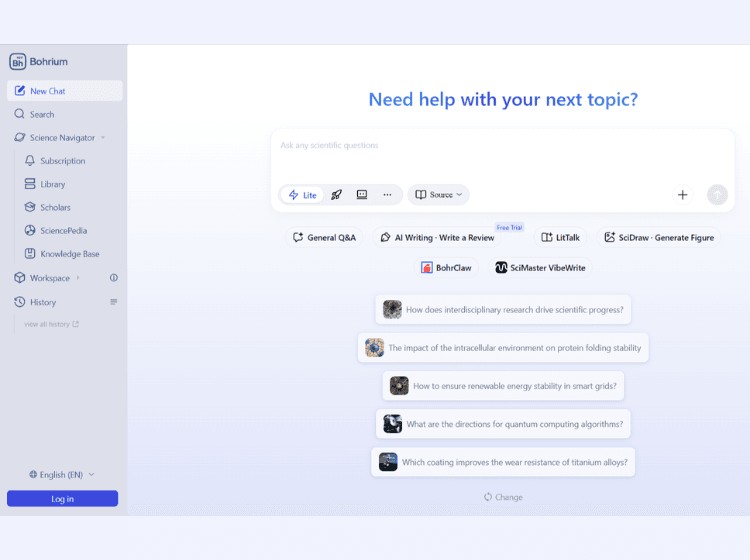
What is Bohrium: Overview
Bohrium is an AI-driven research platform focused on scientific discovery and academic collaboration. The platform provides AI-powered academic search across millions of papers, patents, journals, and scholar profiles, helping researchers access trusted scientific information more efficiently.
Bohrium includes tools for paper summarization, AI-assisted reading, research organization, datasets, notebooks, and collaborative scientific workflows. Users can search research using natural language queries, interact with papers through AI chat features, and save research materials into a centralized knowledge base.
The platform also supports research-focused utilities such as subscriptions for real-time updates, computing resources, research notebooks, and domain-specific applications. Bohrium emphasizes research privacy and states that personal data is not used for model training.
It is primarily aimed at scientists, academic researchers, engineers, and institutions looking for a centralized AI research environment with integrated scientific tools and large-scale academic databases.
Key Features of Bohrium
- AI-powered academic search across scientific disciplines
- Access to millions of research papers, patents, and scholar profiles
- AI-assisted paper reading, summarization, and Q&A
- Knowledge base for organizing and managing research materials
- Research notebooks, datasets, and scientific computing resources
How to Use Bohrium: Step-by-Step
Here are the step-by-step guide to start using the Bohrium platform.
Step 1. Visit the official Bohrium website and create an account.
Step 2. Log into the platform dashboard.
Step 3. Enter scientific or academic questions into the AI search bar.
Step 4. Browse research papers, journals, patents, and scholar profiles.
Step 5. Open papers to access AI summaries and reading assistance.
Step 6. Use the “Chat with Paper” or research Q&A features for deeper understanding.
Step 7. Save papers and references into the knowledge base for organization.
Step 8. Access datasets, notebooks, or computing tools for research workflows.
Step 9. Subscribe to topics, journals, or researchers for personalized updates.
Step 10. Collaborate with teams or institutions through shared research resources.
Use Cases of Bohrium
- Academic literature review and paper discovery
- AI-assisted scientific research workflows
- Research paper summarization and analysis
- Organizing datasets and scientific resources
- Cross-disciplinary research collaboration
Target Audience
- Academic researchers
- Scientists and engineers
- PhD scholars and students
- Research institutions and universities
- Data scientists working on scientific projects
- R&D teams in technical industries
Bohrium Pricing
1. Free Plan | $0/month
-
Daily Credits: Covers standard academic searches and basic journal/scholar exploration.
-
Knowledge Base: Full access to SciencePedia, a massive scientific database.
2. Pro Plan | From $15/month
-
Advanced Tools: Unlocks higher credit limits for “Deep Research” and AI Mentorship.
-
Priority Speed: Faster processing times for all queries.
3. Institutional & Student Plans | Custom Pricing
-
Tailored discounts available for students, individual researchers, universities, and large organizations.